 Bod School
Bod School · Lesson 3
Admin impersonation DM scams: four steps, and where to stop each one
11pm. a new member asks in the group why his wallet won't connect. within a minute he gets a DM. the avatar is the group owner's. so is the name, plus one extra space. "admin here. click this to verify your wallet and i'll take a look." next morning he's back in the group asking why his wallet is empty.
we've seen this one more times than we can count. the script barely changes. four steps, and every one of them has a place you can stop it.
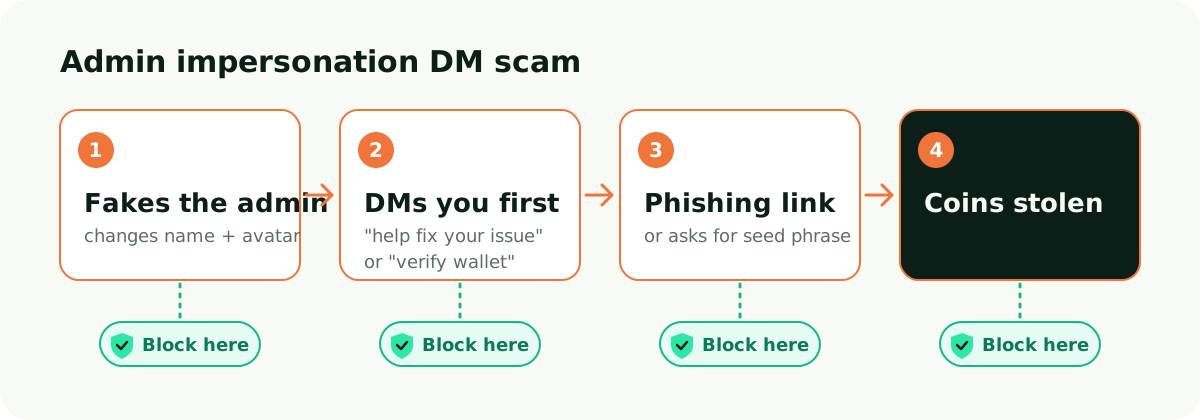
Step 1. Fakes the admin
No hacking needed. The scammer copies an admin's display name and avatar, joins the group and waits. Most people read a DM by the picture. Almost nobody checks the username.
Timing matters to them too. Late at night when the mods are offline. Weekends. Right after something broke and everyone is nervous.
Stop it here. Pin the usernames of every admin, not just display names, and tell members to trust usernames only. If your platform has a setting that protects admin names or stops new members from changing theirs, turn it on. Every so often, search the member list for names that copy an admin and remove them.
Step 2. DMs you first
Scammers watch for public questions. Whoever posts "can't withdraw" or "wallet error" gets a DM. The excuse is almost always one of two. We'll fix your issue, or you need to verify your wallet.
Real admins rarely DM first. Make that a rule, and the scam DM gives itself away.
Stop it here. Pin one line. Admins will never DM you first. When someone asks a question in public, an admin answers in public and adds a warning. Copy and paste this:
Saw your question. Heads up, if anyone DMs you now saying they're an admin, it isn't us. We only answer in the group and we never DM first.
Step 3. Phishing link or asks for seed phrase
Once the chat is going, the scammer sends a "verification page" or a "support form". It looks a lot like the real site. It asks you to connect and sign, or to type in your seed phrase. Some don't bother with a link. They just say send me your seed phrase and I'll restore the wallet.
No real project or platform ever needs your seed phrase. Same with signatures. If you can't read what you're signing, don't sign it.
Stop it here. Keep official links in the pinned message only, and say plainly that any link outside the pin is not ours. If you can, stop new members from posting links, or turn on a link filter that only allows your official domain. Add one more line to the pin. Anyone who asks for your seed phrase is a scammer.
Step 4. Coins stolen
By now the funds are usually gone. Onchain transfers almost never come back. What the owner can do is stop the same scammer from getting a second person.
Victims tend to come back to the group for help, and that's when things get loud. If the owner stays quiet, the scammer often DMs again posing as a "recovery service".
Stop it here. Post a warning to the whole group right away and pin it. Name the fake account's username, then remove and report it. Copy and paste this:
Warning. An account is posing as an admin and DMing members. Username is (fill in). We've removed and reported it. Admins never DM first and never ask for your seed phrase. If you clicked a strange link or signed something, move what's left to a new wallet now and revoke any approvals you don't recognise. Ignore anyone who offers to "recover" your funds. That's the second round of the same scam.
Owner checklist
Every admin username is in the pinned message.
The pin says admins never DM first.
Official links live in the pin and nowhere else.
New members can't post links, or a link filter is on.
Every admin account has 2FA turned on.
Public questions get public answers from an admin.
The incident warning is written before you need it.
A pinned announcement you can copy
[Scam warning]
1. Admins will never DM you first. A DM from an "admin" is a scam.
2. Our admins are these usernames only. (fill in) Trust the username, not the avatar or display name.
3. Anyone asking for your seed phrase or private key is a scammer.
4. Official links are the ones in this pin. (fill in) Don't click anything else.
5. Ask questions in the group. Admins answer here.
FAQ
Sometimes an admin really does need to talk privately. What then?
Flip it. The member DMs the admin, never the other way round. The admin says in the group "please DM me" and gives their username. The member checks it and starts the chat.
It's already pinned. Why do people still fall for it?
Plenty of members never read the pin. A quick public reminder each time someone asks a question works better than the pin alone. Put the same line in your welcome message too.
A member got scammed. Is the owner on the hook?
That depends on your own project's rules, and this lesson doesn't cover it. What the owner can do right now is warn the group, remove the fake account, help the victim save the chat history and point them to the platform's report option.
We removed the scammer and they came back on a new account.
Very common. Entry verification for new members, plus limits on DMs and links for new accounts, stops most repeat joins. Member reports catch the rest, so make sure everyone knows who to report to.
ChatBod is the cross-language chat app for global crypto communities. AI real-time translation lets members who speak different languages talk in the same group.